文章目录
-
- 1 登录后台管理窗口
- 2 登录数据访问窗口
- 3使用客户端工具连接
1 登录后台管理窗口
使用9066端口登录后台管理窗口,此登录方式用于管理维护Mycat
[root@mycat opt]# mysql -umycat -p123456 -h 127.0.0.1 -P 9066
Welcome to the MariaDB monitor.  Commands end with ; or \g.
Your MySQL connection id is 2
Server version: 5.6.29-mycat-1.6-RELEASE-20161028204710 MyCat Server (monitor)

Copyright (c) 2000, 2018, Oracle, MariaDB Corporation Ab and others.

Type 'help;' or '\h' for help. Type '\c' to clear the current input statement.

MySQL [(none)]>
常用的命令
MySQL [(none)]> show @@help;
+------------------------------------------+--------------------------------------------+
| STATEMENT                                | DESCRIPTION                                |
+------------------------------------------+--------------------------------------------+
| show @@time.current                      | Report current timestamp                   |
| show @@time.startup                      | Report startup timestamp                   |
| show @@version                           | Report Mycat Server version                |
| show @@server                            | Report server status                       |
| show @@threadpool                        | Report threadPool status                   |
| show @@database                          | Report databases                           |
| show @@datanode                          | Report dataNodes                           |
| show @@datanode where schema = ?         | Report dataNodes                           |
| show @@datasource                        | Report dataSources                         |
| show @@datasource where dataNode = ?     | Report dataSources                         |
| show @@datasource.synstatus              | Report datasource data synchronous         |
| show @@datasource.syndetail where name=? | Report datasource data synchronous detail  |
| show @@datasource.cluster                | Report datasource galary cluster variables |
| show @@processor                         | Report processor status                    |
| show @@command                           | Report commands status                     |
| show @@connection                        | Report connection status                   |
| show @@cache                             | Report system cache usage                  |
| show @@backend                           | Report backend connection status           |
| show @@session                           | Report front session details               |
| show @@connection.sql                    | Report connection sql                      |
| show @@sql.execute                       | Report execute status                      |
| show @@sql.detail where id = ?           | Report execute detail status               |
| show @@sql                               | Report SQL list                            |
| show @@sql.high                          | Report Hight Frequency SQL                 |
| show @@sql.slow                          | Report slow SQL                            |
| show @@sql.resultset                     | Report BIG RESULTSET SQL                   |
| show @@sql.sum                           | Report  User RW Stat                       |
| show @@sql.sum.user                      | Report  User RW Stat                       |
| show @@sql.sum.table                     | Report  Table RW Stat                      |
| show @@parser                            | Report parser status                       |
| show @@router                            | Report router status                       |
| show @@heartbeat                         | Report heartbeat status                    |
| show @@heartbeat.detail where name=?     | Report heartbeat current detail            |
| show @@slow where schema = ?             | Report schema slow sql                     |
| show @@slow where datanode = ?           | Report datanode slow sql                   |
| show @@sysparam                          | Report system param                        |
| show @@syslog limit=?                    | Report system mycat.log                    |
| show @@white                             | show mycat white host                      |
| show @@white.set=?,?                     | set mycat white host,[ip,user]             |
| show @@directmemory=1 or 2               | show mycat direct memory usage             |
| switch @@datasource name:index           | Switch dataSource                          |
| kill @@connection id1,id2,...            | Kill the specified connections             |
| stop @@heartbeat name:time               | Pause dataNode heartbeat                   |
| reload @@config                          | Reload basic config from file              |
| reload @@config_all                      | Reload all config from file                |
| reload @@route                           | Reload route config from file              |
| reload @@user                            | Reload user config from file               |
| reload @@sqlslow=                        | Set Slow SQL Time(ms)                      |
| reload @@user_stat                       | Reset show @@sql  @@sql.sum @@sql.slow     |
| rollback @@config                        | Rollback all config from memory            |
| rollback @@route                         | Rollback route config from memory          |
| rollback @@user                          | Rollback user config from memory           |
| reload @@sqlstat=open                    | Open real-time sql stat analyzer           |
| reload @@sqlstat=close                   | Close real-time sql stat analyzer          |
| offline                                  | Change MyCat status to OFF                 |
| online                                   | Change MyCat status to ON                  |
| clear @@slow where schema = ?            | Clear slow sql by schema                   |
| clear @@slow where datanode = ?          | Clear slow sql by datanode                 |
+------------------------------------------+--------------------------------------------+
58 rows in set (0.00 sec)
2 登录数据访问窗口
使用8066端口访问数据。
MySQL [(none)]> show databases;
+----------+
| DATABASE |
+----------+
| TESTDB   |
+----------+
1 row in set (0.01 sec)

MySQL [(none)]> use TESTDB;
Reading table information for completion of table and column names
You can turn off this feature to get a quicker startup with -A

Database changed
MySQL [TESTDB]> show tables;
+------------------+
| Tables_in_testdb |
+------------------+
| test_table       |
+------------------+
1 row in set (0.00 sec)

MySQL [TESTDB]>
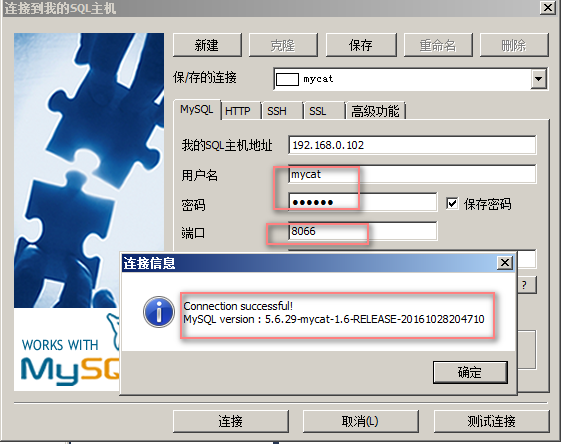
3使用客户端工具连接
使用客户单工具如Navicat、SqlYog等工具连接同普通MySQL连接相似,
- ip:192.168.0.102
- username:mycat
- password:123456
- port:8066
注意
如果提示 10060错误,大部分是由于防火墙的原因,可以关闭下防火墙,Centos7命令如下:
systemctl status firewalld 查看防火墙状态
systemctl stop firewalld 停止防火墙
[root@mycat opt]# systemctl status firewalld
* firewalld.service - firewalld - dynamic firewall daemon
   Loaded: loaded (/usr/lib/systemd/system/firewalld.service; enabled; vendor preset: enabled)
   Active: active (running) since 一 2021-06-14 15:45:28 CST; 6h ago
     Docs: man:firewalld(1)
 Main PID: 836 (firewalld)
    Tasks: 2
   Memory: 424.0K
   CGroup: /system.slice/firewalld.service
           **836 /usr/bin/python2 -Es /usr/sbin/firewalld --nofork --nopid

6月 14 15:48:10 mycat firewalld[836]: WARNING: COMMAND_FAILED: '/usr/sbin/iptables -w10 -t filter -F DOCKER' failed: iptables: No chain/target/match by that name.
6月 14 15:48:10 mycat firewalld[836]: WARNING: COMMAND_FAILED: '/usr/sbin/iptables -w10 -t filter -X DOCKER' failed: iptables: No chain/target/match by that name.
6月 14 15:48:10 mycat firewalld[836]: WARNING: COMMAND_FAILED: '/usr/sbin/iptables -w10 -t filter -F DOCKER-ISOLATION-STAGE-1' failed: iptables: No chain/target/match by that name.
6月 14 15:48:10 mycat firewalld[836]: WARNING: COMMAND_FAILED: '/usr/sbin/iptables -w10 -t filter -X DOCKER-ISOLATION-STAGE-1' failed: iptables: No chain/target/match by that name.
6月 14 15:48:10 mycat firewalld[836]: WARNING: COMMAND_FAILED: '/usr/sbin/iptables -w10 -t filter -F DOCKER-ISOLATION-STAGE-2' failed: iptables: No chain/target/match by that name.
6月 14 15:48:10 mycat firewalld[836]: WARNING: COMMAND_FAILED: '/usr/sbin/iptables -w10 -t filter -X DOCKER-ISOLATION-STAGE-2' failed: iptables: No chain/target/match by that name.
6月 14 15:48:10 mycat firewalld[836]: WARNING: COMMAND_FAILED: '/usr/sbin/iptables -w10 -t filter -F DOCKER-ISOLATION' failed: iptables: No chain/target/match by that name.
6月 14 15:48:10 mycat firewalld[836]: WARNING: COMMAND_FAILED: '/usr/sbin/iptables -w10 -t filter -X DOCKER-ISOLATION' failed: iptables: No chain/target/match by that name.
6月 14 15:48:11 mycat firewalld[836]: WARNING: COMMAND_FAILED: '/usr/sbin/iptables -w10 -D FORWARD -i docker0 -o docker0 -j DROP' failed: iptables: Bad rule (does a matching ...that chain?).
6月 14 15:48:12 mycat firewalld[836]: WARNING: COMMAND_FAILED: '/usr/sbin/iptables -w10 -D FORWARD -i docker0 -o docker0 -j DROP' failed: iptables: Bad rule (does a matching ...that chain?).
Hint: Some lines were ellipsized, use -l to show in full.
[root@mycat opt]# systemctl stop firewalld
[root@mycat opt]# systemctl status firewalld
* firewalld.service - firewalld - dynamic firewall daemon
   Loaded: loaded (/usr/lib/systemd/system/firewalld.service; enabled; vendor preset: enabled)
   Active: inactive (dead) since 一 2021-06-14 22:31:07 CST; 2s ago
     Docs: man:firewalld(1)
  Process: 836 ExecStart=/usr/sbin/firewalld --nofork --nopid $FIREWALLD_ARGS (code=exited, status=0/SUCCESS)
 Main PID: 836 (code=exited, status=0/SUCCESS)

6月 14 15:48:10 mycat firewalld[836]: WARNING: COMMAND_FAILED: '/usr/sbin/iptables -w10 -t filter -F DOCKER-ISOLATION-STAGE-1' failed: iptables: No chain/target/match by that name.
6月 14 15:48:10 mycat firewalld[836]: WARNING: COMMAND_FAILED: '/usr/sbin/iptables -w10 -t filter -X DOCKER-ISOLATION-STAGE-1' failed: iptables: No chain/target/match by that name.
6月 14 15:48:10 mycat firewalld[836]: WARNING: COMMAND_FAILED: '/usr/sbin/iptables -w10 -t filter -F DOCKER-ISOLATION-STAGE-2' failed: iptables: No chain/target/match by that name.
6月 14 15:48:10 mycat firewalld[836]: WARNING: COMMAND_FAILED: '/usr/sbin/iptables -w10 -t filter -X DOCKER-ISOLATION-STAGE-2' failed: iptables: No chain/target/match by that name.
6月 14 15:48:10 mycat firewalld[836]: WARNING: COMMAND_FAILED: '/usr/sbin/iptables -w10 -t filter -F DOCKER-ISOLATION' failed: iptables: No chain/target/match by that name.
6月 14 15:48:10 mycat firewalld[836]: WARNING: COMMAND_FAILED: '/usr/sbin/iptables -w10 -t filter -X DOCKER-ISOLATION' failed: iptables: No chain/target/match by that name.
6月 14 15:48:11 mycat firewalld[836]: WARNING: COMMAND_FAILED: '/usr/sbin/iptables -w10 -D FORWARD -i docker0 -o docker0 -j DROP' failed: iptables: Bad rule (does a matching ...that chain?).
6月 14 15:48:12 mycat firewalld[836]: WARNING: COMMAND_FAILED: '/usr/sbin/iptables -w10 -D FORWARD -i docker0 -o docker0 -j DROP' failed: iptables: Bad rule (does a matching ...that chain?).
6月 14 22:31:04 mycat systemd[1]: Stopping firewalld - dynamic firewall daemon...
6月 14 22:31:07 mycat systemd[1]: Stopped firewalld - dynamic firewall daemon.
Hint: Some lines were ellipsized, use -l to show in full.
[root@mycat opt]#
关注公众号,获取更多咨询

版权声明:本文不是「本站」原创文章,版权归原作者所有 | 原文地址: