
ElasticSearch7.3学习(九)—-Mapping核心数据类型及dynamic mapping
1、mapping的核心数据类型以及dynamic mapping
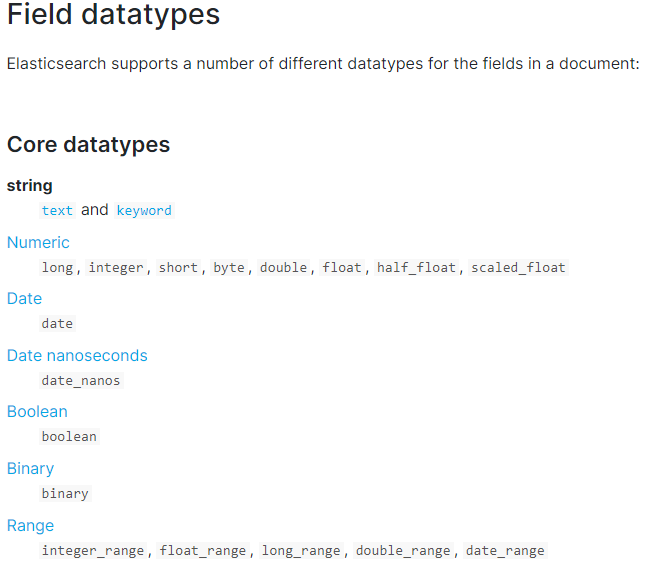
1.1 核心的数据类型
string :text and keyword,byte,short,integer,long,float,double,boolean,date
详见:https://www.elastic.co/guide/en/elasticsearch/reference/7.3/mapping-types.html。
下图是ES7.3核心的字段类型如下:
1.2 dynamic mapping 推测规则
true or false --> boolean

123 --> long

123.45 --> double

2019-01-01 --> date

"hello world" --> text/keywod
1.3 查看索引mapping
语法如下:
GET index_name/_mapping
数字加了引号,为什么 Elasticsearch 的 sum 就报错?
写入 {"quantity":"42"} 返回 201,直到对 quantity 求和才报错。先用 _mapping 看看字段类型。下面只改变首条文档里 42 的引号,其余设置相同,以便对照 Elasticsearch 实际建出了什么映射。
复现命令
实验使用 Elasticsearch 8.19.25。容器断网,没有映射端口,也没有挂载宿主机目录。请求都由容器里的 curl 发送到 127.0.0.1:9200。脚本结束后停止并删除本次容器。首次运行先拉取镜像,再把下方完整脚本保存为 run.sh。也可以直接解压实验脚本与原始响应。
docker pull docker.elastic.co/elasticsearch/elasticsearch:8.19.25
sh run.sh es-mapping-evidence > es-mapping-run.log 2>&1
#!/bin/sh
set -eu

image=docker.elastic.co/elasticsearch/elasticsearch:8.19.25
out=${1:-es-mapping-evidence}
mkdir "$out"

docker image inspect --format '{{json .RepoDigests}}' "$image" > "$out/image.json"
container=$(docker run --pull=never --rm -d --network none --hostname localhost --memory 2g \
  -e 'discovery.type=single-node' -e 'xpack.security.enabled=false' \
  -e 'ES_JAVA_OPTS=-Xms512m -Xmx512m' "$image")
trap 'docker stop --time 10 "$container" >/dev/null 2>&1 || true' EXIT
docker inspect --format 'network={{.HostConfig.NetworkMode}} ports={{json .HostConfig.PortBindings}} mounts={{json .Mounts}}' \
  "$container" > "$out/isolation.txt"

base=http://127.0.0.1:9200
health="$base/_cluster/health?wait_for_status=yellow&timeout=2s"
for attempt in $(seq 1 45); do
  if docker exec "$container" curl -fsS --max-time 4 "$health" > "$out/health.json" 2>/dev/null &&
    grep -q '"timed_out":false' "$out/health.json"; then
    break
  fi
  sleep 1
done
grep -q '"timed_out":false' "$out/health.json" || { docker logs --tail 30 "$container" >&2; exit 1; }

# Preserve the response body and HTTP status even when Elasticsearch rejects a request.
request() {
  label=$1
  method=$2
  path=$3
  shift 3
  printf '\n[%s] %s %s\n' "$label" "$method" "$path"
  if [ "$#" -gt 0 ]; then
    printf '%s\n' "$1"
    set -- -H 'Content-Type: application/json' --data-binary "$1"
  fi
  docker exec "$container" curl -sS --max-time 30 -w '\nHTTP %{http_code}\n' \
    -X "$method" "$base$path" "$@" > "$out/$label.txt"
  cat "$out/$label.txt"
}

request version GET '/?filter_path=version.number&pretty'

# 1. Compare the first quantity in two fresh indexes.
settings='{"settings":{"number_of_shards":1,"number_of_replicas":0}}'
request number-index PUT '/quantity-number?pretty' "$settings"
request string-index PUT '/quantity-string?pretty' "$settings"
request number-write PUT '/quantity-number/_doc/1?refresh=true&pretty' '{"quantity":42}'
request string-write PUT '/quantity-string/_doc/1?refresh=true&pretty' '{"quantity":"42"}'
request number-mapping GET '/quantity-number/_mapping?pretty'
request string-mapping GET '/quantity-string/_mapping?pretty'

# 2. Run the same aggregation on both indexes.
sum='{"size":0,"aggs":{"total_quantity":{"sum":{"field":"quantity"}}}}'
request number-sum POST '/quantity-number/_search?pretty' "$sum"
request string-sum POST '/quantity-string/_search?pretty' "$sum"

# 3. Try an in-place field type change and read the mapping again.
request change-type PUT '/quantity-string/_mapping?pretty' \
  '{"properties":{"quantity":{"type":"long"}}}'
request string-after GET '/quantity-string/_mapping?pretty'

# 4. Require JSON numbers at the time of writing.
request strict-index PUT '/quantity-strict?pretty' \
  '{"settings":{"number_of_shards":1,"number_of_replicas":0},"mappings":{"properties":{"quantity":{"type":"long","coerce":false}}}}'
request strict-mapping GET '/quantity-strict/_mapping?pretty'
request strict-string PUT '/quantity-strict/_doc/rejected?refresh=true&pretty' '{"quantity":"42"}'
request strict-42 PUT '/quantity-strict/_doc/1?refresh=true&pretty' '{"quantity":42}'
request strict-8 PUT '/quantity-strict/_doc/2?refresh=true&pretty' '{"quantity":8}'
request strict-count GET '/quantity-strict/_count?pretty'
request strict-sum POST '/quantity-strict/_search?pretty' "$sum"
1. 首条文档决定默认映射
两个空索引各写入一条文档,都返回 HTTP 201。用 _mapping 查到的响应如下。第一个字段是 long,第二个字段是 text,附带 keyword 子字段。Elasticsearch 8.19 默认关闭 numeric_detection,数字字符串不会凭外观被识别成整数。Elastic 8.19 动态字段映射
{
  "quantity-number" : {
    "mappings" : {
      "properties" : {
        "quantity" : {
          "type" : "long"
        }
      }
    }
  }
}
{
  "quantity-string" : {
    "mappings" : {
      "properties" : {
        "quantity" : {
          "type" : "text",
          "fields" : {
            "keyword" : {
              "type" : "keyword",
              "ignore_above" : 256
            }
          }
        }
      }
    }
  }
}
2. 用同一条 sum 检查两种映射
| 索引 | 字段类型 | HTTP | sum(quantity) |
|---|---|---|---|
quantity-number | long | 200 | 42.0 |
quantity-string | text | 400 | 查询失败 |
字符串索引的错误里有 Fielddata is disabled on [quantity]。先查字段类型再决定怎么修。这里要算数值总和,开启 fielddata 或改查 quantity.keyword 都不会把字段变成数值类型。Elastic 8.19 Sum 聚合
{
  "error" : {
    "root_cause" : [
      {
        "type" : "illegal_argument_exception",
        "reason" : "Fielddata is disabled on [quantity] in [quantity-string]. Text fields are not optimised for operations that require per-document field data like aggregations and sorting, so these operations are disabled by default. Please use a keyword field instead. Alternatively, set fielddata=true on [quantity] in order to load field data by uninverting the inverted index. Note that this can use significant memory."
      }
    ],
    "type" : "search_phase_execution_exception",
    "reason" : "all shards failed",
    "phase" : "query",
    "grouped" : true,
    "failed_shards" : [
      {
        "shard" : 0,
        "index" : "quantity-string",
        "node" : "ixMIraNSS5i5UwZuMtX_tA",
        "reason" : {
          "type" : "illegal_argument_exception",
          "reason" : "Fielddata is disabled on [quantity] in [quantity-string]. Text fields are not optimised for operations that require per-document field data like aggregations and sorting, so these operations are disabled by default. Please use a keyword field instead. Alternatively, set fielddata=true on [quantity] in order to load field data by uninverting the inverted index. Note that this can use significant memory."
        }
      }
    ],
    "caused_by" : {
      "type" : "illegal_argument_exception",
      "reason" : "Fielddata is disabled on [quantity] in [quantity-string]. Text fields are not optimised for operations that require per-document field data like aggregations and sorting, so these operations are disabled by default. Please use a keyword field instead. Alternatively, set fielddata=true on [quantity] in order to load field data by uninverting the inverted index. Note that this can use significant memory.",
      "caused_by" : {
        "type" : "illegal_argument_exception",
        "reason" : "Fielddata is disabled on [quantity] in [quantity-string]. Text fields are not optimised for operations that require per-document field data like aggregations and sorting, so these operations are disabled by default. Please use a keyword field instead. Alternatively, set fielddata=true on [quantity] in order to load field data by uninverting the inverted index. Note that this can use significant memory."
      }
    }
  },
  "status" : 400
}

HTTP 400
3. 在原索引上更改类型
对 quantity-string 执行 PUT _mapping,尝试把 quantity 改成 long,返回下面的 400。重查映射,字段依然是 text。如果要保留已有数据,可以先建好新索引,按目标映射规范化输入后再迁移。Elastic 8.19 更新映射
{
  "error" : {
    "root_cause" : [
      {
        "type" : "illegal_argument_exception",
        "reason" : "mapper [quantity] cannot be changed from type [text] to [long]"
      }
    ],
    "type" : "illegal_argument_exception",
    "reason" : "mapper [quantity] cannot be changed from type [text] to [long]"
  },
  "status" : 400
}

HTTP 400
4. 让新索引在写入时检查类型
新索引 quantity-strict 在建索引时指定 long 和 coerce: false,实际查询得到下面这份映射。Elastic 8.19 coerce 参数
{
  "quantity-strict" : {
    "mappings" : {
      "properties" : {
        "quantity" : {
          "type" : "long",
          "coerce" : false
        }
      }
    }
  }
}
带引号的 "42" 在写入时返回 400,原始响应的最里层原因是 Long value passed as String。
{
  "error" : {
    "root_cause" : [
      {
        "type" : "document_parsing_exception",
        "reason" : "[1:13] failed to parse field [quantity] of type [long] in document with id 'rejected'. Preview of field's value: '42'"
      }
    ],
    "type" : "document_parsing_exception",
    "reason" : "[1:13] failed to parse field [quantity] of type [long] in document with id 'rejected'. Preview of field's value: '42'",
    "caused_by" : {
      "type" : "illegal_argument_exception",
      "reason" : "Long value passed as String"
    }
  },
  "status" : 400
}

HTTP 400
整数 42 和 8 的写入都返回 HTTP 201。随后 _count 返回 2 条,sum(quantity) 返回 50.0。需要做数值聚合的字段,可以在建索引时就声明类型,并让调用端按约定发送 JSON 数字。
完整运行日志包含每条请求、原始响应和 HTTP 状态码。首次搭环境可参考 8.19.25 单节点快速开始。数字探测和模板见第 13 讲定制动态映射,旧索引迁移的背景见第 14 讲重建索引。
2、手动管理mapping
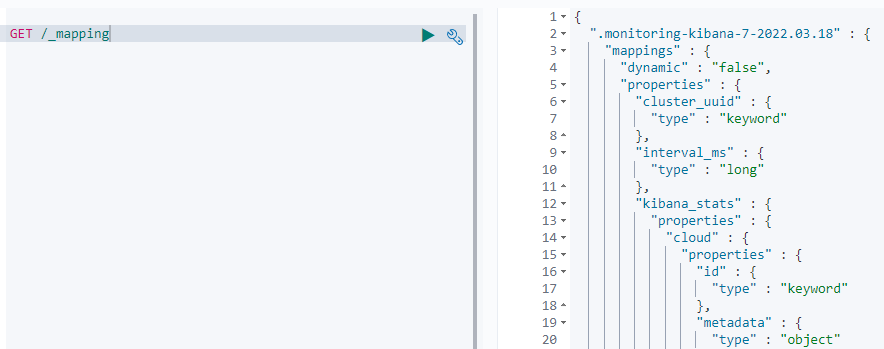
2.1 查询所有索引的映射
语法如下:
GET /_mapping
结果如下:
2.2 创建映射
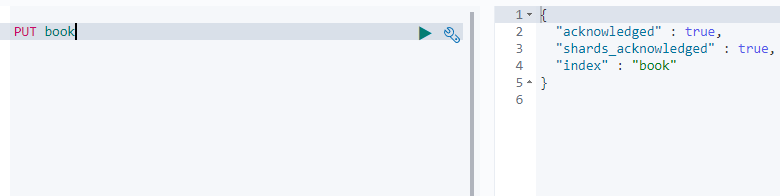
首先创建索引
PUT book
结果如下
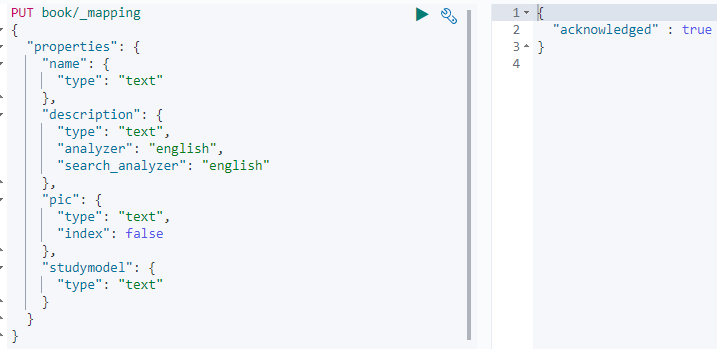
创建索引后,应该立即手动创建映射
PUT book/_mapping
{
    "properties": {
           "name": {
                  "type": "text"
            },
           "description": {
              "type": "text",
              "analyzer":"english",
              "search_analyzer":"english"
           },
           "pic":{
             "type":"text",
             "index":false
           },
           "studymodel":{
             "type":"text"
           }
    }
}
结果如下:
2.3 字段解释
2.3.1 Text 文本类型
1)analyzer:通过analyzer属性指定分词器。上边指定了analyzer是指在索引和搜索都使用english,如果单独想定义搜索时使用的分词器则可以通过search_analyzer属性。
2)index:index属性指定是否索引。默认为index=true,即要进行索引,只有进行索引才可以从索引库搜索到。但是也有一些内容不需要索引,比如:商品图片地址只被用来展示图片,不进行搜索图片,此时可以将index设置为false。删除索引,重新创建映射,将pic的index设置为false,尝试根据pic去搜索,结果搜索不到数据。
3)store:是否在source之外存储,每个文档索引后会在 ES中保存一份原始文档,存放在"_source"中,一般情况下不需要设置store为true,因为在_source中已经有一份原始文档了。
举个例子,插入以下文档:
PUT /book/_doc/1
{
  "name":"Bootstrap开发框架",
  "description":"Bootstrap是由Twitter推出的一个前台页面开发框架,在行业之中使用较为广泛。此开发框架包含了大量的CSS、JS程序代码,可以帮助开发者(尤其是不擅长页面开发的程序人员)轻松的实现一个不受浏览器限制的精美界面效果。",
  "pic":"group1/M00/00/01/wKhlQFqO4MmAOP53AAAcwDwm6SU490.jpg",
  "studymodel":"201002"
}
结果如下:
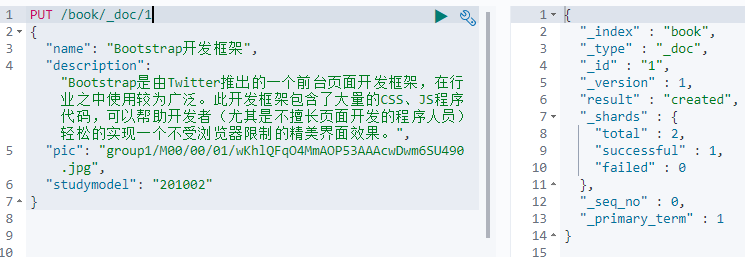
分别用以下语句来判断是否
GET /book/_search?q=name:开发
GET /book/_search?q=description:开发
GET /book/_search?q=pic:group1/M00/00/01/wKhlQFqO4MmAOP53AAAcwDwm6SU490.jpg
GET /book/_search?q=studymodel:201002
通过测试发现:除了第三条语句,其余均能搜索出结果。也就是说name、description及studymodel都支持全文检索,除了pic不可作为查询条件。
2.3.2 keyword关键字字段
目前已经取代了"index": false。上边介绍的text文本字段在映射时要设置分词器,keyword字段为关键字字段,通常搜索keyword是按照整体搜索,所以创建keyword字段的索引时是不进行分词的,比如:邮政编码、手机号码、身份证等。keyword字段通常用于过虑、排序、聚合等。
2.3.3 date日期类型
日期类型不用设置分词器。
通常日期类型的字段用于排序。
format:通过format设置日期格式
例子:下边的设置允许date字段存储年月日时分秒、年月日及毫秒三种格式。
{
  "properties": {
    "timestamp": {
      "type": "date",
      "format": "yyyy-MM-dd HH:mm:ss||yyyy-MM-dd"
    }
  }
}
2.3.4 数值类型
下边是ES支持的数值类型
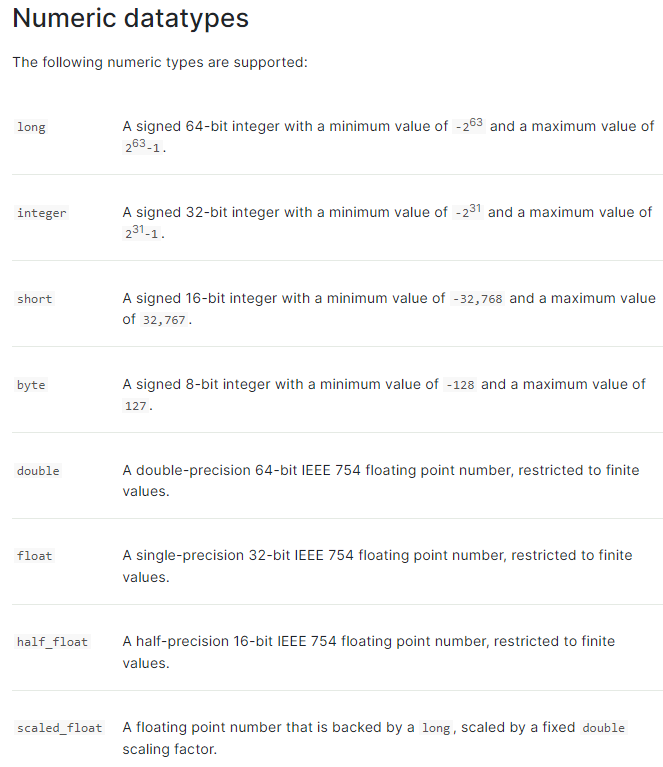
在选择数据类型的是,应尽量遵循下面的规范:
1、 尽量选择范围小的类型,提高搜索效率;
2、 对于浮点数尽量用比例因子,比如一个价格字段,单位为元,我们将比例因子设置为100这在ES中会按分存储,映射如下:;
"price": {
        "type": "scaled_float",
        "scaling_factor": 100
  },
由于比例因子为100,如果我们输入的价格是23.45。则ES中会将23.45乘以100存储在ES中。如果输入的价格是23.456,ES会将23.456乘以100再取一个接近原始值的数,得出2346。使用比例因子的好处是整型比浮点型更易压缩,节省磁盘空间。如果比例因子不适合,则从表中选择范围小的去用:
2.4 修改映射
只能创建index时手动建立mapping,或者新增field mapping,但是不能update field mapping。因为已有数据按照映射早已分词存储好,如果修改的话,那这些存量数据怎么办。
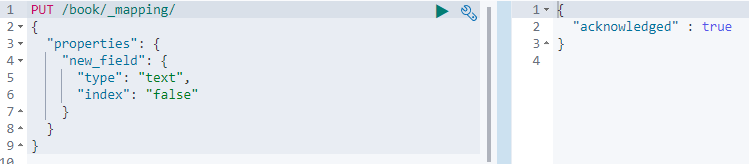
新增一个字段mapping
PUT /book/_mapping/
{
  "properties": {
    "new_field": {
      "type": "text",
      "index": "false"
    }
  }
}
结果如下:
如果直接修改mapping的话会报错
PUT /book/_mapping/
{
  "properties" : {
    "studymodel" : {
     "type" :    "keyword"
    }
  }
}
返回:
{
  "error": {
    "root_cause": [
      {
        "type": "illegal_argument_exception",
        "reason": "mapper [studymodel] of different type, current_type [text], merged_type [keyword]"
      }
    ],
    "type": "illegal_argument_exception",
    "reason": "mapper [studymodel] of different type, current_type [text], merged_type [keyword]"
  },
  "status": 400
}
2.5 删除映射
通过删除索引的方式来删除映射。
DELETE /book
3、复杂数据类型
3.1 multivalue field
如下所示,字段里面存放的是数组
{ "tags": [ "tag1", "tag2" ]}
建立索引时与string是一样的,注意数组里面存放的数据的数据类型不能混
3.2 empty field
空值存放
null,[],[null]
如果是text或者keyword类型,空值为null,如果是数组类型的话,空值为后面两个中的任意一个。
3.3 object field
意思就是字段里面存放的是一个对象
PUT /company/_doc/1
{
  "address": {
    "country": "china",
    "province": "guangdong",
    "city": "guangzhou"
  },
  "name": "jack",
  "age": 27,
  "join_date": "2019-01-01"
}
执行上面语句:
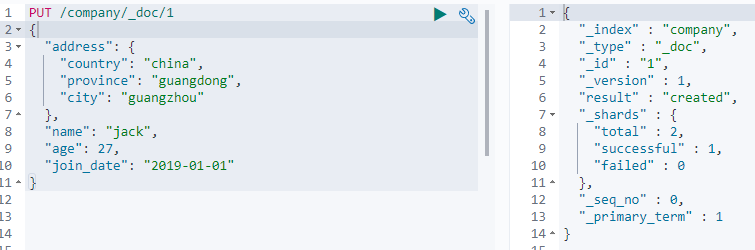
其中的address field 就是object类型
查询company映射
GET /company/_mapping
返回:
{
  "company" : {
    "mappings" : {
      "properties" : {
        "address" : {
          "properties" : {
            "city" : {
              "type" : "text",
              "fields" : {
                "keyword" : {
                  "type" : "keyword",
                  "ignore_above" : 256
                }
              }
            },
            "country" : {
              "type" : "text",
              "fields" : {
                "keyword" : {
                  "type" : "keyword",
                  "ignore_above" : 256
                }
              }
            },
            "province" : {
              "type" : "text",
              "fields" : {
                "keyword" : {
                  "type" : "keyword",
                  "ignore_above" : 256
                }
              }
            }
          }
        },
        "age" : {
          "type" : "long"
        },
        "join_date" : {
          "type" : "date"
        },
        "name" : {
          "type" : "text",
          "fields" : {
            "keyword" : {
              "type" : "keyword",
              "ignore_above" : 256
            }
          }
        }
      }
    }
  }
}
3.4 底层存储格式
object类型:
{
  "address": {
    "country": "china",
    "province": "guangdong",
    "city": "guangzhou"
  },
  "name": "jack",
  "age": 27,
  "join_date": "2017-01-01"
}
对应的底层存储格式,可以看到其实就是扁平化处理了
{
    "name":            [jack],
    "age":          [27],
    "join_date":      [2017-01-01],
    "address.country":         [china],
    "address.province":   [guangdong],
    "address.city":  [guangzhou]
}
对象数组:
{
    "authors": [
        { "age": 26, "name": "Jack White"},
        { "age": 55, "name": "Tom Jones"},
        { "age": 39, "name": "Kitty Smith"}
    ]
}
存储格式:
{
    "authors.age":    [26, 55, 39],
    "authors.name":   [jack, white, tom, jones, kitty, smith]
}
本文来自博客园,作者:|旧市拾荒|,转载请注明原文链接:https://www.cnblogs.com/xiaoyh/p/16006272.html
posted @ 2022-03-19 23:14 |旧市拾荒| 阅读( 376) 评论( 0) 编辑 收藏 举报
版权声明:本文不是「本站」原创文章,版权归原作者所有 | 原文地址: