
前面的示例已经涉及 ChatModel、ChatMessage、ChatMemory 和 AiServices。本讲集中介绍 AIService 的接口代理方式,再通过模型与 AIService 监听器观察输入输出、调用事件和上下文属性。
基本用法
1.1 定义业务接口
/**
 * @author junmingyang
 */
public interface ChineseTeacher {

    @SystemMessage("你是一名小学语文老师")
    @UserMessage("请用中文回答我的问题:{{it}}")
    String chat(String query);

//    @SystemMessage("你是一名小学语文老师")
//    @UserMessage("请用中文回答我的问题:{{query}}")
//    String chat(String query);

//    @SystemMessage("你是一名小学语文老师")
//    @UserMessage("请用中文回答我的问题:{{abc}}")
//    String chat(@V("abc") String query);
}
注:{{it}}是LangChain4j内部约定的默认占位符名。当只有一个参数时,{{it}}在运行时,会自动替换成用户的prompt. 当然也可以强制指定参数名,就本示例而言,注释的二种写法,完全等效。
1.2 使用AiServices创建实例
    /**
     * 演示AIService基本用法
     * by 菩提树下的杨过(yjmyzz.cnblogs.com)
     * @param query
     * @return
     */
    @GetMapping(value = "/aiservice/1", produces = MediaType.APPLICATION_JSON_VALUE)
    public ResponseEntity<String> demo1(@RequestParam(defaultValue = "请问李清照最广为流传的词是哪一首,请给出这首词全文?") String query) {
        try {
            ChineseTeacher teacher = AiServices.builder(ChineseTeacher.class)
                    .chatModel(ollamaChatModel)
                    .chatMemory(MessageWindowChatMemory.withMaxMessages(10))
                    .build();
            return ResponseEntity.ok(teacher.chat(query));
        } catch (Exception e) {
            return ResponseEntity.ok("{\"error\":\"chatChain error: " + e.getMessage() + "\"}");
        }
    }
原文运行效果:
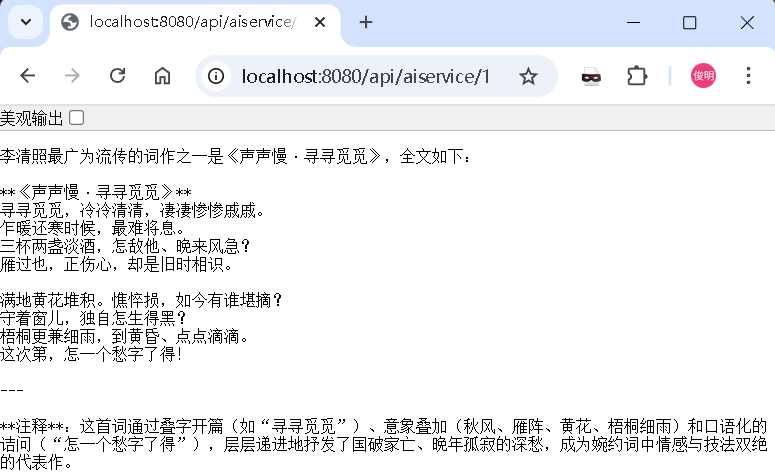
原文配图:AIService 与调用可观测性示意 1。
结构化输出
AIService还可以将输出结果,以结构化输出(即:直接输出强类型的POJO对象),继续将上述示例改造一下:
2.1 定义POJO对象
/**
 * @author junmingyang(菩提树下的杨过)
 */
@Data
@AllArgsConstructor
@NoArgsConstructor
public class Poem {

    @Description("标题")
    private String title;

    @Description("作者")
    private String author;

    @Description("内容")
    private String content;
}
2.2 定义抽取器接口
/**
 * @author junmingyang
 */
public interface PoemExtractor {
    @UserMessage("请从以下内容中提取出诗歌内容:{{query}}")
    Poem extract(@V("query") String query);
}
2.3 使用示例
    /**
     * 演示AIService基本用法+结构化返回
     *
     * @param query
     * @return
     */
    @GetMapping(value = "/aiservice/2", produces = MediaType.APPLICATION_JSON_VALUE)
    public ResponseEntity<Poem> demo2(@RequestParam(defaultValue = """
            请问李清照最广为流传的词是哪一首,
            请给出这首词全文(以json格式输出,类似{\"author\":\"...\",\"title\":\"...\",\"content\":\"...\"})?""") String query) {
        try {
            Poem extract = AiServices.builder(PoemExtractor.class)
                    .chatModel(ollamaChatModel).build()
                    .extract(AiServices.builder(ChineseTeacher.class)
                            .chatModel(ollamaChatModel)
                            .chatMemory(MessageWindowChatMemory.withMaxMessages(10))
                            .build().chat(query));
            return ResponseEntity.ok(extract);
        } catch (Exception e) {
            return ResponseEntity.ok(new Poem("error", "error", e.getMessage()));
        }
    }
运行效果:
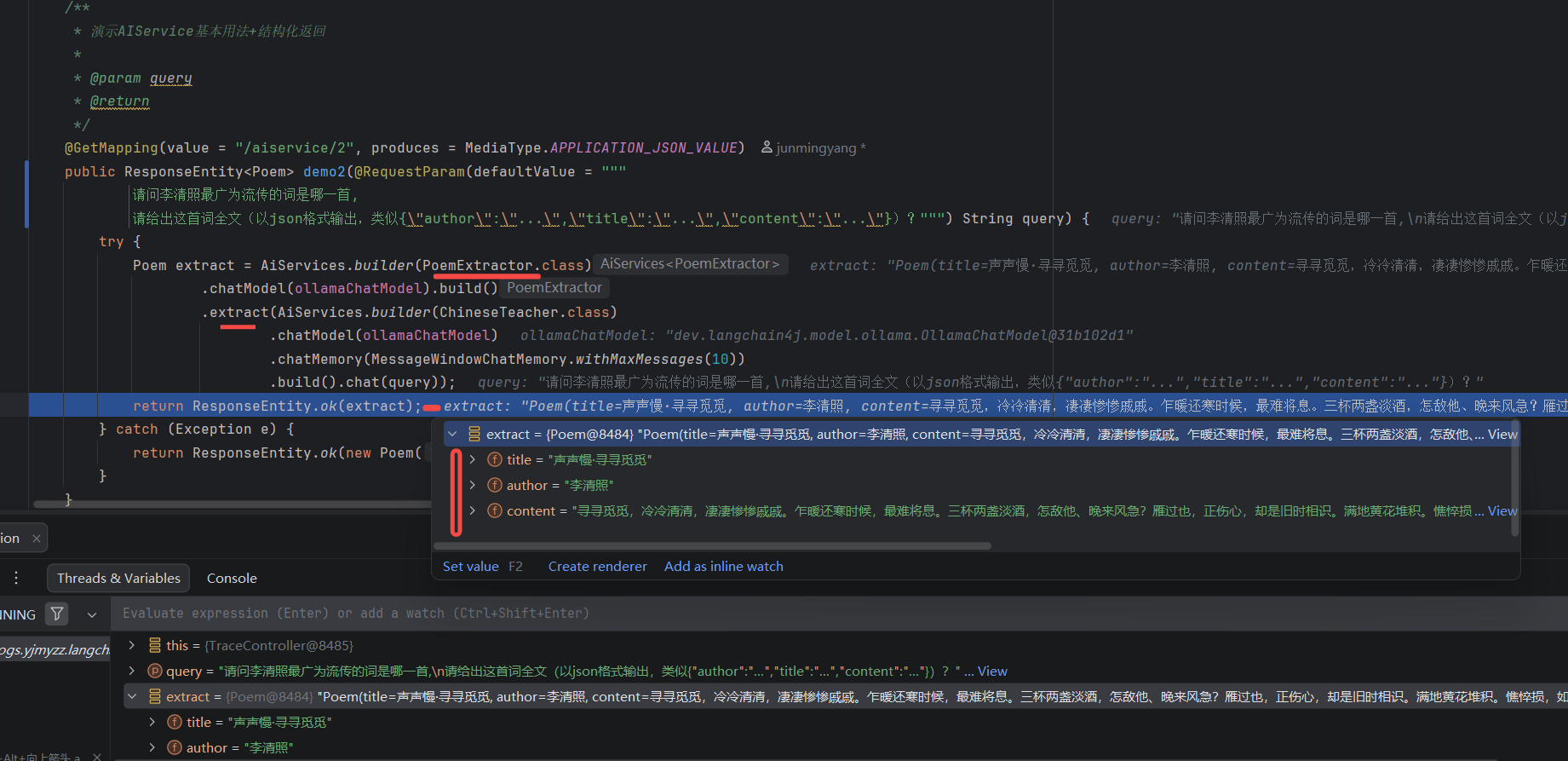
原文配图:AIService 与调用可观测性示意 2。
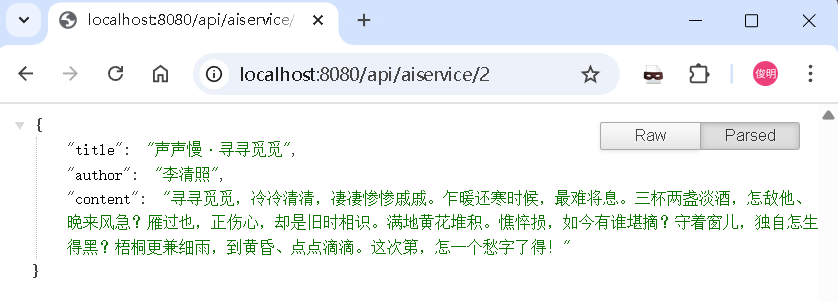
原文配图:AIService 与调用可观测性示意 3。
流式响应
    /**
     * 演示AIService基本用法+流式返回
     *
     * @param query
     * @return
     */
    @GetMapping(value = "/aiservice/3", produces = "text/html;charset=utf-8")
    public Flux<String> demo3(@RequestParam(defaultValue = "请问李清照最广为流传的词是哪一首,请给出这首词全文?") String query) {
        ChineseStreamTeacher teacher = AiServices.builder(ChineseStreamTeacher.class)
                .streamingChatModel(streamingChatModel)
                .build();

        Sinks.Many<String> sink = Sinks.many().unicast().onBackpressureBuffer();
        teacher.chat(query)
                .onPartialResponse((String s) -> sink.tryEmitNext(escapeToHtml(s)))
                .onCompleteResponse((ChatResponse response) -> sink.tryEmitComplete())
                .onError(sink::tryEmitError)
                .start();
        return sink.asFlux();
    }
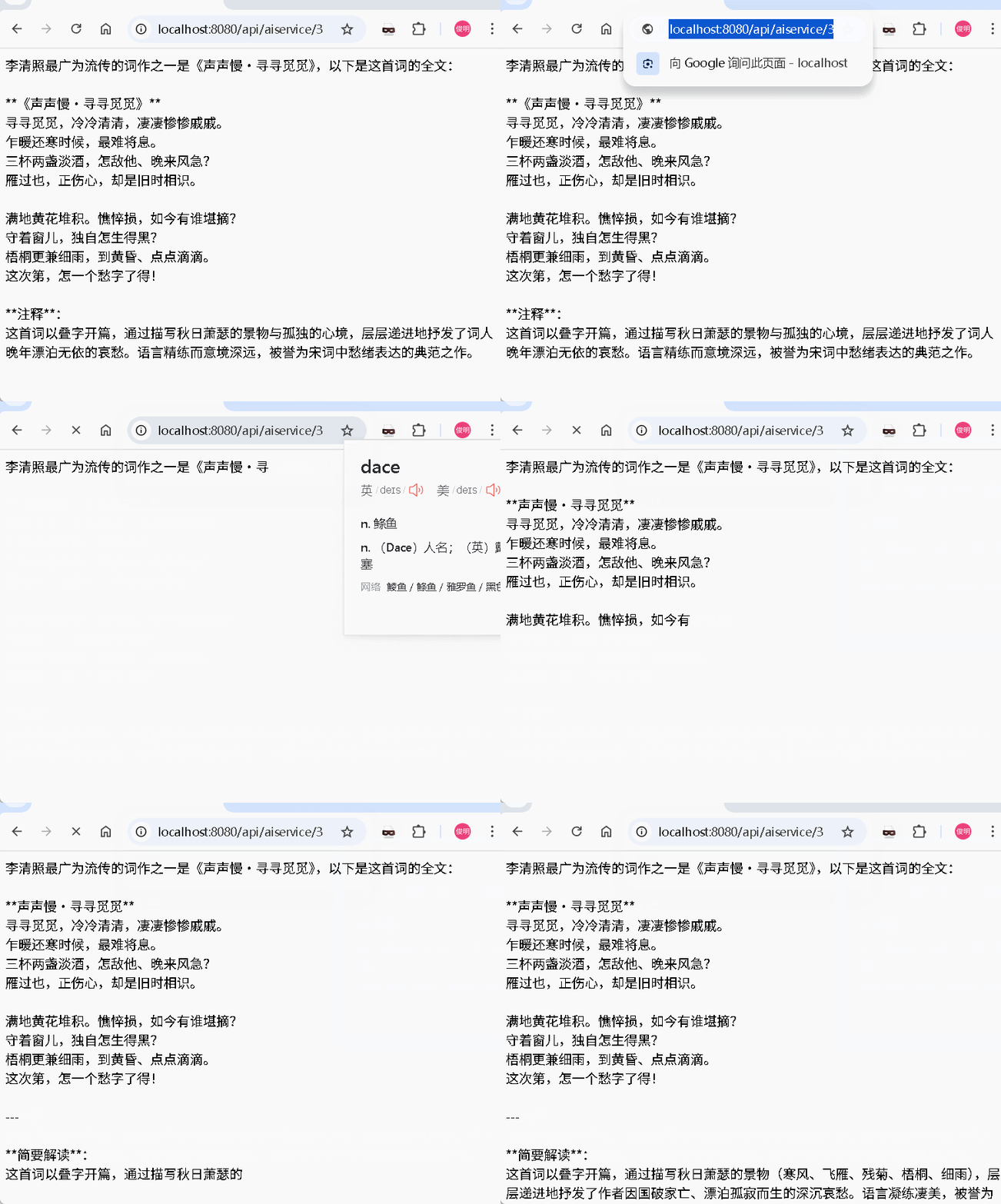
原文配图:AIService 与调用可观测性示意 5。
可观测性与 trace 跟踪
LLM应用中,trace跟踪是很重要,比如:每次请求消耗了多少token,哪个环节耗时最大,每次请求LLM的输入/输出是什么…
4.1 model级别的监听器
/**
 * 自定义ChatModelListener(监听器)
 */
public class CustomChatModelListener implements ChatModelListener {
    @Override
    public void onRequest(ChatModelRequestContext requestContext) {
        ChatRequest chatRequest = requestContext.chatRequest();

        List<ChatMessage> messages = chatRequest.messages();
        System.out.println(messages);

        ChatRequestParameters parameters = chatRequest.parameters();
        System.out.println(parameters);

        System.out.println(requestContext.modelProvider());

        Map<Object, Object> attributes = requestContext.attributes();
        attributes.put("my-attribute", "my-value");
    }

    @Override
    public void onResponse(ChatModelResponseContext responseContext) {
        ChatResponse chatResponse = responseContext.chatResponse();

        AiMessage aiMessage = chatResponse.aiMessage();
        System.out.println(aiMessage);

        ChatResponseMetadata metadata = chatResponse.metadata();
        System.out.println(metadata);

        TokenUsage tokenUsage = metadata.tokenUsage();
        System.out.println(tokenUsage);

        ChatRequest chatRequest = responseContext.chatRequest();
        System.out.println(chatRequest);

        System.out.println(responseContext.modelProvider());

        Map<Object, Object> attributes = responseContext.attributes();
        System.out.println(attributes.get("my-attribute"));
    }

    @Override
    public void onError(ChatModelErrorContext errorContext) {
        Throwable error = errorContext.error();
        error.printStackTrace();

        ChatRequest chatRequest = errorContext.chatRequest();
        System.out.println(chatRequest);

        System.out.println(errorContext.modelProvider());

        Map<Object, Object> attributes = errorContext.attributes();
        System.out.println(attributes.get("my-attribute"));
    }
}
自定义一个listener,可以把LLM的输入、输出、错误信息都拿到,按实际业务需求做相应处理(比如:记日志,或存储便于离线分析),在注入model时,加上这个监听器
    @Bean("ollamaChatModel")
    public ChatModel chatModel() {
        return OllamaChatModel.builder()
                .baseUrl(ollamaBaseUrl)
                .modelName(ollamaModel)
                .timeout(Duration.ofSeconds(timeoutSeconds))
                .logRequests(true)
                .logResponses(true)
                //加入监听器
                .listeners(List.of(new CustomChatModelListener()))
                .build();
    }
4.2 AiService监听器
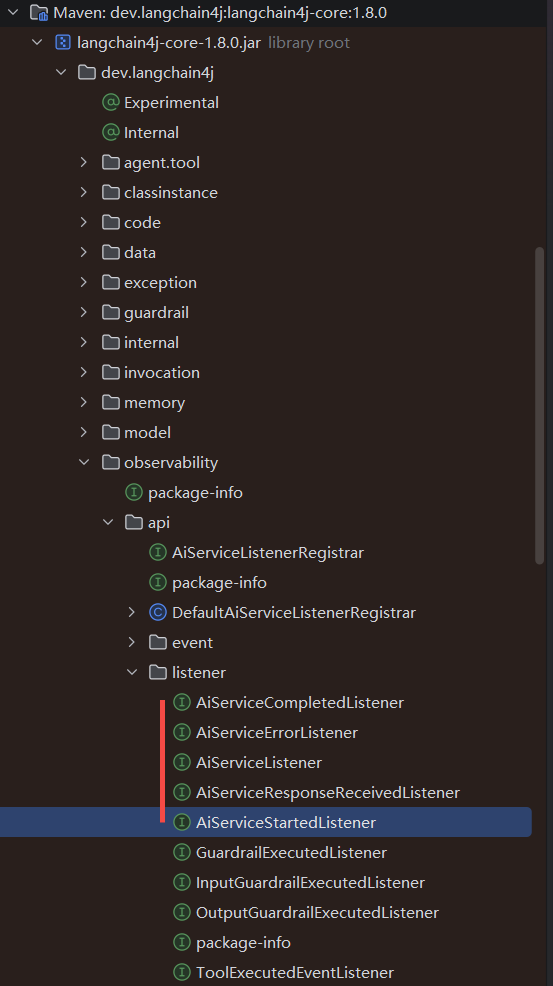
原文配图:AIService 与调用可观测性示意 4。
LangChain4j内置这几种AiService的监听器,这里我们挑两个做为示例
/**
 * @author junmingyang
 */
public class CustomAiServiceStartedListener implements AiServiceStartedListener {

    @Override
    public void onEvent(AiServiceStartedEvent event) {
        InvocationContext invocationContext = event.invocationContext();
        Optional<SystemMessage> systemMessage = event.systemMessage();
        UserMessage userMessage = event.userMessage();

        // 所有与同一LLM调用相关的事件,invocationId将保持一致
        UUID invocationId = invocationContext.invocationId();
        String aiServiceInterfaceName = invocationContext.interfaceName();
        String aiServiceMethodName = invocationContext.methodName();
        List<Object> aiServiceMethodArgs = invocationContext.methodArguments();
        Object chatMemoryId = invocationContext.chatMemoryId();
        Instant eventTimestamp = invocationContext.timestamp();

        System.out.println("AiServiceStartedEvent: " +
                "invocationId=" + invocationId +
                ", aiServiceInterfaceName=" + aiServiceInterfaceName +
                ", aiServiceMethodName=" + aiServiceMethodName +
                ", aiServiceMethodArgs=" + aiServiceMethodArgs +
                ", chatMemoryId=" + chatMemoryId +
                ", eventTimestamp=" + eventTimestamp +
                ", userMessage=" + userMessage +
                ", systemMessage=" + systemMessage);
    }


}
public class CustomAiServiceCompletedListener implements AiServiceCompletedListener {
    @Override
    public void onEvent(AiServiceCompletedEvent event) {
        InvocationContext invocationContext = event.invocationContext();
        Optional<Object> result = event.result();

        UUID invocationId = invocationContext.invocationId();
        String aiServiceInterfaceName = invocationContext.interfaceName();
        String aiServiceMethodName = invocationContext.methodName();
        List<Object> aiServiceMethodArgs = invocationContext.methodArguments();
        Object chatMemoryId = invocationContext.chatMemoryId();
        Instant eventTimestamp = invocationContext.timestamp();

        System.out.println("AiServiceCompletedListener: " +
                "invocationId=" + invocationId +
                ", aiServiceInterfaceName=" + aiServiceInterfaceName +
                ", aiServiceMethodName=" + aiServiceMethodName +
                ", aiServiceMethodArgs=" + aiServiceMethodArgs +
                ", chatMemoryId=" + chatMemoryId +
                ", eventTimestamp=" + eventTimestamp +
                ", result=" + result);
    }
}
顾名思义,一个是start(开始)的监听器,一个是complete(完成)的监听器
    /**
     * 演示AIService基本用法+自定义监听器
     *
     * @param query
     * @return
     */
    @GetMapping(value = "/aiservice/4", produces = MediaType.APPLICATION_JSON_VALUE)
    public ResponseEntity<String> demo4(@RequestParam(defaultValue = "请问李清照最广为流传的词是哪一首,请给出这首词全文?") String query) {
        try {
            ChineseTeacher teacher = AiServices.builder(ChineseTeacher.class)
                    .chatModel(ollamaChatModel)
                    .chatMemory(MessageWindowChatMemory.withMaxMessages(10))
                    //加入监听器
                    .registerListeners(List.of(new CustomAiServiceStartedListener(), new CustomAiServiceCompletedListener()))
                    .build();
            return ResponseEntity.ok(teacher.chat(query));
        } catch (Exception e) {
            return ResponseEntity.ok("{\"error\":\"chatChain error: " + e.getMessage() + "\"}");
        }
    }
加入以上listener后,我们来看看运行时的控制台输出
查看原文日志(未经本站复测)
 1 AiServiceStartedEvent: invocationId=6a0e5f23-6a30-4485-8ed3-49c9a0ac6d5a, aiServiceInterfaceName=com.cnblogs.yjmyzz.langchain4j.study.service.ChineseTeacher, aiServiceMethodName=chat, aiServiceMethodArgs=[请问李清照最广为流传的词是哪一首,请给出这首词全文?], chatMemoryId=default, eventTimestamp=2026-01-11T06:19:51.685233Z, userMessage=UserMessage { name = null, contents = [TextContent { text = "请用中文回答我的问题:请问李清照最广为流传的词是哪一首,请给出这首词全文?" }], attributes = {} }, systemMessage=Optional[SystemMessage { text = "你是一名小学语文老师" }]
 2 [SystemMessage { text = "你是一名小学语文老师" }, UserMessage { name = null, contents = [TextContent { text = "请用中文回答我的问题:请问李清照最广为流传的词是哪一首,请给出这首词全文?" }], attributes = {} }]
 3 OllamaChatRequestParameters{modelName="deepseek-v3.1:671b-cloud", temperature=null, topP=null, topK=null, frequencyPenalty=null, presencePenalty=null, maxOutputTokens=null, stopSequences=[], toolSpecifications=[], toolChoice=null, responseFormat=null, mirostat=null, mirostatEta=null, mirostatTau=null, numCtx=null, repeatLastN=null, repeatPenalty=null, seed=null, minP=null, keepAlive=null, think=null}
 4 OLLAMA
 5 2026-01-11T14:19:51.860+08:00  INFO 25716 --- [langchain4j-study] [nio-8080-exec-1] d.l.http.client.log.LoggingHttpClient    : HTTP request:
 6 - method: POST
 7 - url: http://localhost:11434/api/chat
 8 - headers: [Content-Type: application/json]
 9 - body: {
10   "model" : "deepseek-v3.1:671b-cloud",
11   "messages" : [ {
12     "role" : "system",
13     "content" : "你是一名小学语文老师"
14   }, {
15     "role" : "user",
16     "content" : "请用中文回答我的问题:请问李清照最广为流传的词是哪一首,请给出这首词全文?"
17   } ],
18   "options" : {
19     "stop" : [ ]
20   },
21   "stream" : false,
22   "tools" : [ ]
23 }
24
25 2026-01-11T14:19:54.570+08:00  INFO 25716 --- [langchain4j-study] [nio-8080-exec-1] d.l.http.client.log.LoggingHttpClient    : HTTP response:
26 - status code: 200
27 - headers: [content-type: application/json; charset=utf-8], [date: Sun, 11 Jan 2026 06:19:54 GMT], [transfer-encoding: chunked]
28 - body: {"model":"deepseek-v3.1:671b-cloud","remote_model":"deepseek-v3.1:671b","remote_host":"https://ollama.com:443","created_at":"2026-01-11T06:19:54.384141206Z","message":{"role":"assistant","content":"李清照最广为传诵的词作之一是《声声慢·寻寻觅觅》,这首词以深婉哀怨的笔触抒发了国破家亡、颠沛流离的愁绪。全文如下:\n\n**《声声慢·寻寻觅觅》**  \n寻寻觅觅,冷冷清清,凄凄惨惨戚戚。  \n乍暖还寒时候,最难将息。  \n三杯两盏淡酒,怎敌他、晚来风急?  \n雁过也,正伤心,却是旧时相识。  \n\n满地黄花堆积。憔悴损,如今有谁堪摘?  \n守着窗儿,独自怎生得黑?  \n梧桐更兼细雨,到黄昏、点点滴滴。  \n这次第,怎一个愁字了得!\n\n---\n\n**注释**:  \n1. 词中叠字开篇“寻寻觅觅,冷冷清清,凄凄惨惨戚戚”,通过音律重叠强化了孤寂无依的意境;  \n2. “雁过也”借秋雁南飞暗喻往事不可追的哀痛;  \n3. 结尾“怎一个愁字了得”以反问收束,将愁绪推向极致,余韵绵长。\n\n这首词因语言精炼、情感深切,成为宋婉约词的典范之作。"},"done":true,"done_reason":"stop","total_duration":2242392515,"prompt_eval_count":33,"eval_count":272}
29
30
31 AiMessage { text = "李清照最广为传诵的词作之一是《声声慢·寻寻觅觅》,这首词以深婉哀怨的笔触抒发了国破家亡、颠沛流离的愁绪。全文如下:
32
33 **《声声慢·寻寻觅觅》**
34 寻寻觅觅,冷冷清清,凄凄惨惨戚戚。
35 乍暖还寒时候,最难将息。
36 三杯两盏淡酒,怎敌他、晚来风急?
37 雁过也,正伤心,却是旧时相识。
38
39 满地黄花堆积。憔悴损,如今有谁堪摘?
40 守着窗儿,独自怎生得黑?
41 梧桐更兼细雨,到黄昏、点点滴滴。
42 这次第,怎一个愁字了得!
43
44 ---
45
46 **注释**:
47 1. 词中叠字开篇“寻寻觅觅,冷冷清清,凄凄惨惨戚戚”,通过音律重叠强化了孤寂无依的意境;
48 2. “雁过也”借秋雁南飞暗喻往事不可追的哀痛;
49 3. 结尾“怎一个愁字了得”以反问收束,将愁绪推向极致,余韵绵长。
50
51 这首词因语言精炼、情感深切,成为宋婉约词的典范之作。", thinking = null, toolExecutionRequests = [], attributes = {} }
52 ChatResponseMetadata{id='null', modelName='deepseek-v3.1:671b-cloud', tokenUsage=TokenUsage { inputTokenCount = 33, outputTokenCount = 272, totalTokenCount = 305 }, finishReason=STOP}
53 TokenUsage { inputTokenCount = 33, outputTokenCount = 272, totalTokenCount = 305 }
54 ChatRequest { messages = [SystemMessage { text = "你是一名小学语文老师" }, UserMessage { name = null, contents = [TextContent { text = "请用中文回答我的问题:请问李清照最广为流传的词是哪一首,请给出这首词全文?" }], attributes = {} }], parameters = OllamaChatRequestParameters{modelName="deepseek-v3.1:671b-cloud", temperature=null, topP=null, topK=null, frequencyPenalty=null, presencePenalty=null, maxOutputTokens=null, stopSequences=[], toolSpecifications=[], toolChoice=null, responseFormat=null, mirostat=null, mirostatEta=null, mirostatTau=null, numCtx=null, repeatLastN=null, repeatPenalty=null, seed=null, minP=null, keepAlive=null, think=null} }
55 OLLAMA
56 my-value
57 AiServiceCompletedListener: invocationId=6a0e5f23-6a30-4485-8ed3-49c9a0ac6d5a, aiServiceInterfaceName=com.cnblogs.yjmyzz.langchain4j.study.service.ChineseTeacher, aiServiceMethodName=chat, aiServiceMethodArgs=[请问李清照最广为流传的词是哪一首,请给出这首词全文?], chatMemoryId=default, eventTimestamp=2026-01-11T06:19:51.685233Z, result=Optional[李清照最广为传诵的词作之一是《声声慢·寻寻觅觅》,这首词以深婉哀怨的笔触抒发了国破家亡、颠沛流离的愁绪。全文如下:
58
59 **《声声慢·寻寻觅觅》**
60 寻寻觅觅,冷冷清清,凄凄惨惨戚戚。
61 乍暖还寒时候,最难将息。
62 三杯两盏淡酒,怎敌他、晚来风急?
63 雁过也,正伤心,却是旧时相识。
64
65 满地黄花堆积。憔悴损,如今有谁堪摘?
66 守着窗儿,独自怎生得黑?
67 梧桐更兼细雨,到黄昏、点点滴滴。
68 这次第,怎一个愁字了得!
69
70 ---
71
72 **注释**:
73 1. 词中叠字开篇“寻寻觅觅,冷冷清清,凄凄惨惨戚戚”,通过音律重叠强化了孤寂无依的意境;
74 2. “雁过也”借秋雁南飞暗喻往事不可追的哀痛;
75 3. 结尾“怎一个愁字了得”以反问收束,将愁绪推向极致,余韵绵长。
76
77 这首词因语言精炼、情感深切,成为宋婉约词的典范之作。]
其中:
行1- 是CustomAiServiceStartedListener的输出
行57- 是CustomAiServiceCompletedListener的输出
行31,54,56等是CustomChatModelListener的输出,其中要注意的是:
CustomChatModelListener.onRequest中, 上下文中示例放了一个自定义属性 my-attribute -> my-value
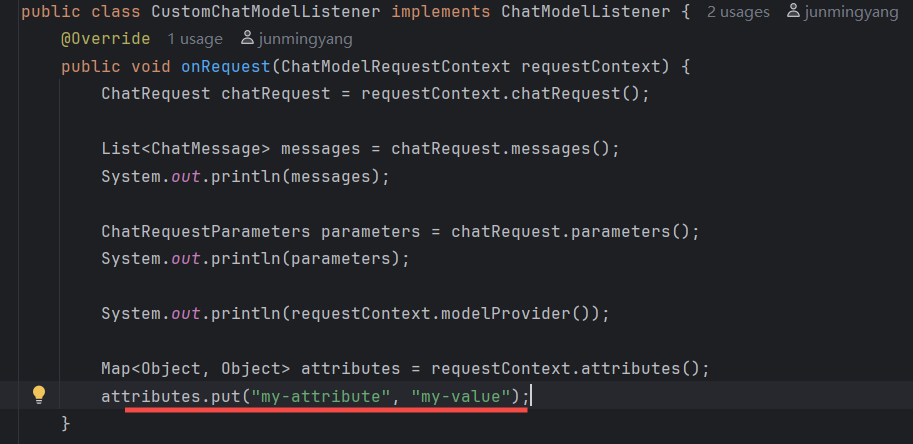
原文配图:AIService 与调用可观测性示意 7。
然后在onResponse中, 在输出结果中,尝试获取这个属性
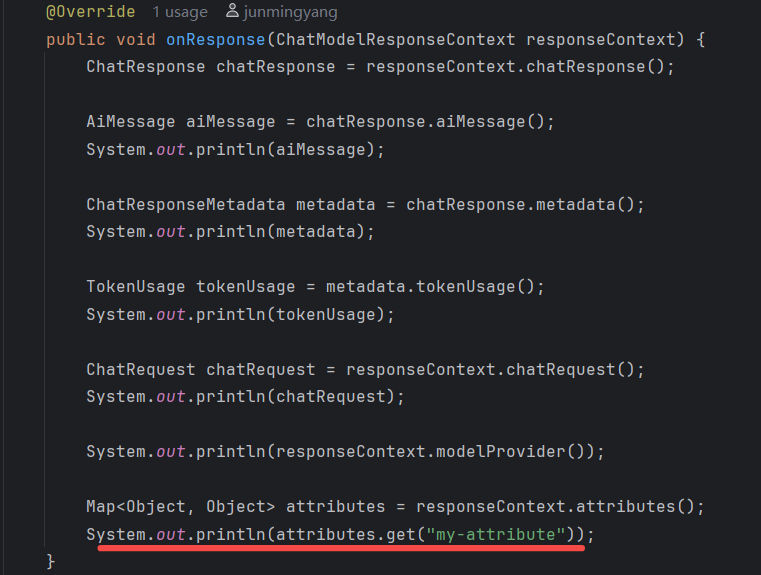
原文配图:AIService 与调用可观测性示意 6。
从56行的日志来看, 拿到了这个附加的自定义属性,可以用这类属性携带业务 trace key,关联调用上下文。
文中代码:
https://github.com/yjmyzz/langchain4j-study/tree/day09
参考: