
本讲离开招聘场景,介绍 ReAct(推理与行动)模式:模型结合当前上下文决定下一步,再通过工具获取结果,继续处理问题。下面先看原文的模式示意图。
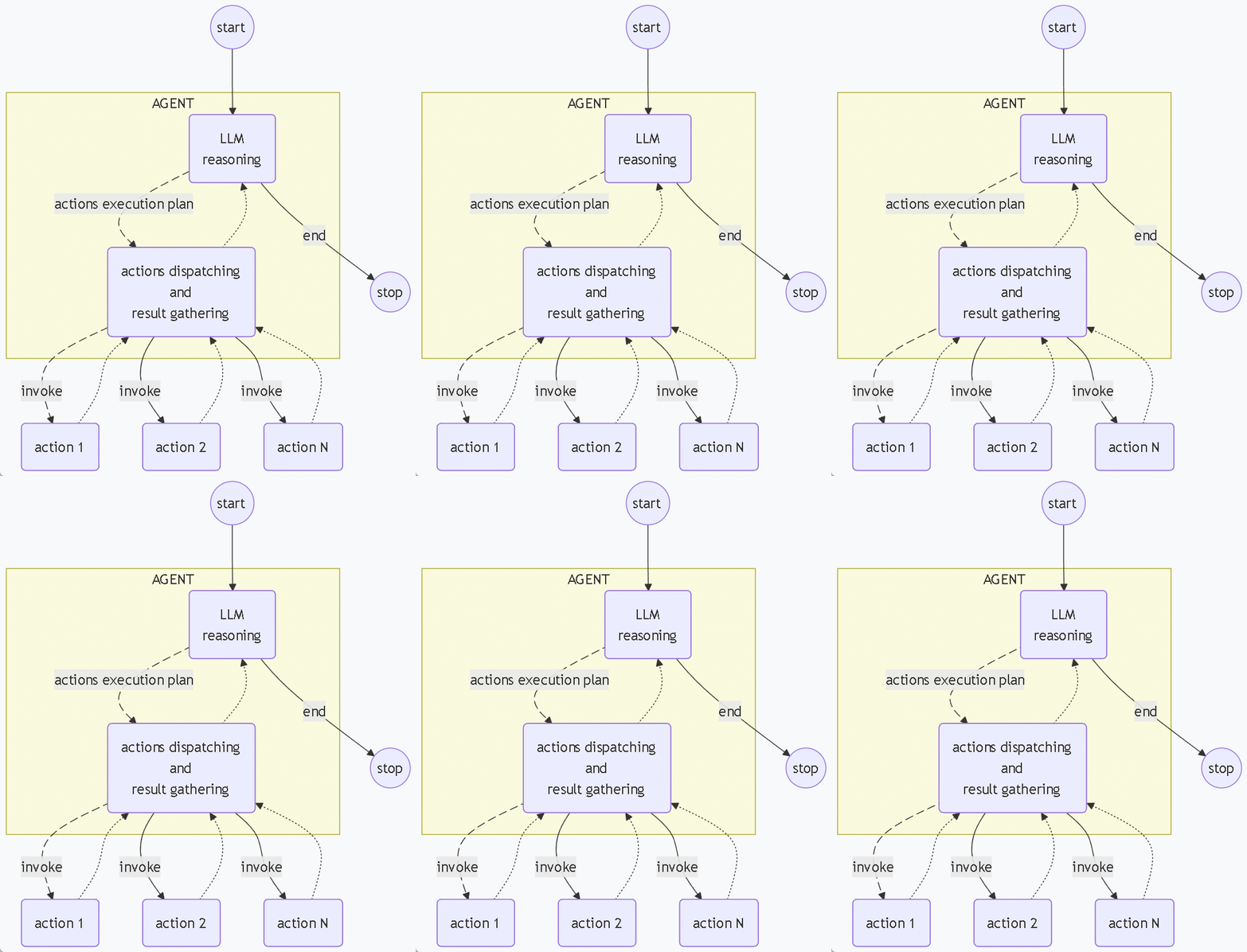
原文配图:ReAct 推理与行动循环。
原文用“思考—行动”的循环来解释这一模式:针对当前问题选择行动,必要时调用工具,再根据结果继续处理后续问题。
定义 ReAct Agent
public interface ReActAssistant {
    @SystemMessage("""
            你是一个使用ReAct(Reasoning and Acting)模式的智能助手。
            请按照以下步骤思考:
            1. 理解用户的问题
            2. 思考解决问题需要什么信息
            3. 如果需要计算或查询,选择合适的工具
            4. 使用工具获取结果
            5. 基于结果给出最终答案

            请用中文思考和回答。
            当使用工具时,明确说明你要使用的工具。
            """)
    @UserMessage("问:{{request}}")
    @Agent("基于用户提供的问题进行思考和回答")
    String chat(@V("request") String request);

}
接口通过系统提示词约定推理与行动的循环,下面将它接入应用。
接入应用与工具
@SpringBootApplication
public class ReActAgentApplication {

    public static void main(String[] args) throws IOException {
        ConfigurableApplicationContext context = SpringApplication.run(AgentDesignPatternApplication.class, args);
        ChatModel model = context.getBean("ollamaChatModel", ChatModel.class);
        SampleTools sampleTools = context.getBean("sampleTools", SampleTools.class);

        ReActAssistant agent = AgenticServices
                .agentBuilder(ReActAssistant.class)
                .chatModel(model)
                .chatMemoryProvider(memoryId -> MessageWindowChatMemory.withMaxMessages(15))
                .tools(sampleTools)
                .build();


        String[] testQueries = {
                "计算 15 加上 27 等于多少?",
                "北京现在的天气怎么样?",
                "计算半径为5的圆的面积",
                "现在是几点?",
                "计算长方体的体积,长10,宽5,高3",
                "帮我算一下 (25 × 4) ÷ 2 等于多少?",
                "快递单123456,现在到哪了?",
                "我的订单56789,退款到账了没?"
        };

        for (String query : testQueries) {
            System.out.println("问: " + query);
            try {
                String response = agent.chat(query);
                System.out.println("答: " + response);
                System.out.println("-".repeat(50));
                // 避免请求过快
                Thread.sleep(1000);
            } catch (Exception e) {
                System.err.println("查询失败: " + e.getMessage());
            }
        }

    }
}
这些问题会用到工具。下面的 SampleTools 包含普通计算和时间读取;天气、快递、退款查询返回示例数据,没有接入真实业务查询服务。
/**
 * @author junmingyang
 */
@Component("sampleTools")
public class SampleTools {

    @Tool("计算两个数的加法运算")
    public String add(double a, double b) {
        double result = a + b;
        System.out.printf("[工具调用] 加法: %.2f + %.2f = %.2f\n", a, b, result);
        return String.format("%.2f + %.2f = %.2f", a, b, result);
    }

    @Tool("计算两个数的减法运算")
    public String subtract(double a, double b) {
        double result = a - b;
        System.out.printf("[工具调用] 减法: %.2f - %.2f = %.2f\n", a, b, result);
        return String.format("%.2f - %.2f = %.2f", a, b, result);
    }

    @Tool("计算两个数的乘法运算")
    public String multiply(double a, double b) {
        double result = a * b;
        System.out.printf("[工具调用] 乘法: %.2f × %.2f = %.2f\n", a, b, result);
        return String.format("%.2f × %.2f = %.2f", a, b, result);
    }

    @Tool("计算两个数的除法运算")
    public String divide(double a, double b) {
        if (b == 0) {
            return "错误:除数不能为零";
        }
        double result = a / b;
        System.out.printf("[工具调用] 除法: %.2f ÷ %.2f = %.2f\n", a, b, result);
        return String.format("%.2f ÷ %.2f = %.2f", a, b, result);
    }

    @Tool("获取当前日期和时间")
    public String getCurrentDateTime() {
        String datetime = LocalDateTime.now().format(
                DateTimeFormatter.ofPattern("yyyy-MM-dd HH:mm:ss")
        );
        System.out.println("[工具调用] 当前时间: " + datetime);
        return datetime;
    }

    @Tool("查询指定城市的天气信息")
    public String getWeather(String city) {
        System.out.println("[工具调用] 查询天气: " + city);
        // 这里可以集成真实的天气API
        return String.format("%s的天气:晴转多云,温度22-28°C,湿度65%%,东南风2级", city);
    }

    @Tool("计算圆的面积")
    public String calculateCircleArea(double radius) {
        double area = Math.PI * radius * radius;
        System.out.printf("[工具调用] 圆面积计算: 半径=%.2f, 面积=%.2f\n", radius, area);
        return String.format("半径为 %.2f 的圆的面积是 %.2f", radius, area);
    }

    @Tool("查询快递单")
    public String queryExpressOrder(String expressOrderNo) {
        System.out.printf("[工具调用] 快递单: %s,已经在运输途中,预订明天送达\n",
                expressOrderNo);
        return String.format("[工具调用] 快递单: %s,已经在运输途中,预订明天送达\n",
                expressOrderNo);
    }

    @Tool("查询退款进度")
    public String queryRefundProgress(String orderNo) {
        System.out.printf("[工具调用] 订单: %s,退款已审批通过,预计1-3个工作日按原路退回\n",
                orderNo);
        return String.format("[工具调用] 订单: %s,退款已审批通过,预计1-3个工作日按原路退回\n",
                orderNo);
    }
}
原文运行输出
展开原文日志或请求/响应(未复测)
问: 计算 15 加上 27 等于多少?
[工具调用] 加法: 15.00 + 27.00 = 42.00
答: 计算结果是:15 + 27 = 42。
--------------------------------------------------
问: 北京现在的天气怎么样?
[工具调用] 查询天气: 北京
答: 北京当前的天气情况是:
- 天气状况:晴转多云
- 温度:22-28°C
- 湿度:65%
- 风力:东南风2级

总体来说天气比较舒适,适合户外活动。
--------------------------------------------------
问: 计算半径为5的圆的面积
[工具调用] 圆面积计算: 半径=5.00, 面积=78.54
答: 半径为5的圆的面积是 **78.54**(平方单位)。

圆的面积计算公式为:π × 半径² = π × 5² = π × 25 ≈ 78.54
--------------------------------------------------
问: 现在是几点?
[工具调用] 当前时间: 2026-01-31 19:47:39
答: 现在的时间是:2026年1月31日 19:47:39
--------------------------------------------------
问: 计算长方体的体积,长10,宽5,高3
[工具调用] 乘法: 10.00 × 5.00 = 50.00
[工具调用] 乘法: 50.00 × 3.00 = 150.00
答: 长方体的体积是 **150**(立方单位)。

长方体体积计算公式:长 × 宽 × 高 = 10 × 5 × 3 = 150
--------------------------------------------------
问: 帮我算一下 (25 × 4) ÷ 2 等于多少?
[工具调用] 乘法: 25.00 × 4.00 = 100.00
[工具调用] 除法: 100.00 ÷ 2.00 = 50.00
答: (25 × 4) ÷ 2 = **50**

计算过程:
- 25 × 4 = 100
- 100 ÷ 2 = 50
--------------------------------------------------
问: 快递单123456,现在到哪了?
[工具调用] 快递单: 123456,已经在运输途中,预订明天送达
答: 您的快递单123456目前状态:
- **物流状态**:已经在运输途中
- **预计送达时间**:明天送达

快递正在正常运输中,请耐心等待。
--------------------------------------------------
问: 我的订单56789,退款到账了没?
[工具调用] 订单: 56789,退款已审批通过,预计1-3个工作日按原路退回
答: 您的订单56789退款状态:
- **退款状态**:退款已审批通过
- **预计到账时间**:1-3个工作日内按原路退回

退款申请已经通过审核,资金将在1-3个工作日内原路返回到您的支付账户,请注意查收。
--------------------------------------------------
上面的输出省略了模型交互的请求与响应。要对照工具选择过程,可以继续查看原文保留的最后一个问题的请求:
展开原文日志或请求/响应(未复测)
{
  "model": "minimax-m2:cloud",
  "messages": [
    {
      "role": "system",
      "content": "你是一个使用ReAct(Reasoning and Acting)模式的智能助手。\n请按照以下步骤思考:\n1. 理解用户的问题\n2. 思考解决问题需要什么信息\n3. 如果需要计算或查询,选择合适的工具\n4. 使用工具获取结果\n5. 基于结果给出最终答案\n\n请用中文思考和回答。\n当使用工具时,明确说明你要使用的工具。\n"
    },
    {
      "role": "assistant",
      "tool_calls": [
        {
          "function": {
            "name": "multiply",
            "arguments": {
              "a": 50,
              "b": 3
            }
          }
        }
      ]
    },
    {
      "role": "tool",
      "content": "50.00 × 3.00 = 150.00"
    },
    {
      "role": "assistant",
      "content": "长方体的体积是 **150** 立方单位。\n\n计算过程:\n- 长方体体积 = 长 × 宽 × 高\n- 10 × 5 × 3 = 150\n\n所以这个长方体的体积为150立方单位。",
      "tool_calls": []
    },
    {
      "role": "user",
      "content": "问:帮我算一下 (25 × 4) ÷ 2 等于多少?"
    },
    {
      "role": "assistant",
      "content": "我来为您计算 (25 × 4) ÷ 2。",
      "tool_calls": [
        {
          "function": {
            "name": "multiply",
            "arguments": {
              "a": 25,
              "b": 4
            }
          }
        }
      ]
    },
    {
      "role": "tool",
      "content": "25.00 × 4.00 = 100.00"
    },
    {
      "role": "assistant",
      "tool_calls": [
        {
          "function": {
            "name": "divide",
            "arguments": {
              "a": 100,
              "b": 2
            }
          }
        }
      ]
    },
    {
      "role": "tool",
      "content": "100.00 ÷ 2.00 = 50.00"
    },
    {
      "role": "assistant",
      "content": "(25 × 4) ÷ 2 = **50**\n\n计算过程:\n- 先算 25 × 4 = 100\n- 再算 100 ÷ 2 = 50\n\n所以答案是 50。",
      "tool_calls": []
    },
    {
      "role": "user",
      "content": "问:快递单123456,现在到哪了?"
    },
    {
      "role": "assistant",
      "content": "我来帮您查询快递单123456的状态。",
      "tool_calls": [
        {
          "function": {
            "name": "queryExpressOrder",
            "arguments": {
              "expressOrderNo": "123456"
            }
          }
        }
      ]
    },
    {
      "role": "tool",
      "content": "[工具调用] 快递单: 123456,已经在运输途中,预订明天送达\n"
    },
    {
      "role": "assistant",
      "content": "您的快递单123456目前状态:**已经在运输途中**,预计**明天送达**。\n\n快递正在正常运输中,请耐心等待。",
      "tool_calls": []
    },
    {
      "role": "user",
      "content": "问:我的订单56789,退款到账了没?"
    }
  ],
  "options": {
    "stop": []
  },
  "stream": false,
  "tools": [
    {
      "type": "function",
      "function": {
        "name": "getWeather",
        "description": "查询指定城市的天气信息",
        "parameters": {
          "type": "object",
          "properties": {
            "city": {
              "type": "string"
            }
          },
          "required": [
            "city"
          ]
        }
      }
    },
    {
      "type": "function",
      "function": {
        "name": "queryExpressOrder",
        "description": "查询快递单",
        "parameters": {
          "type": "object",
          "properties": {
            "expressOrderNo": {
              "type": "string"
            }
          },
          "required": [
            "expressOrderNo"
          ]
        }
      }
    },
    {
      "type": "function",
      "function": {
        "name": "queryRefundProgress",
        "description": "查询退款进度",
        "parameters": {
          "type": "object",
          "properties": {
            "orderNo": {
              "type": "string"
            }
          },
          "required": [
            "orderNo"
          ]
        }
      }
    },
    {
      "type": "function",
      "function": {
        "name": "calculateCircleArea",
        "description": "计算圆的面积",
        "parameters": {
          "type": "object",
          "properties": {
            "radius": {
              "type": "number"
            }
          },
          "required": [
            "radius"
          ]
        }
      }
    },
    {
      "type": "function",
      "function": {
        "name": "getCurrentDateTime",
        "description": "获取当前日期和时间"
      }
    },
    {
      "type": "function",
      "function": {
        "name": "add",
        "description": "计算两个数的加法运算",
        "parameters": {
          "type": "object",
          "properties": {
            "a": {
              "type": "number"
            },
            "b": {
              "type": "number"
            }
          },
          "required": [
            "a",
            "b"
          ]
        }
      }
    },
    {
      "type": "function",
      "function": {
        "name": "multiply",
        "description": "计算两个数的乘法运算",
        "parameters": {
          "type": "object",
          "properties": {
            "a": {
              "type": "number"
            },
            "b": {
              "type": "number"
            }
          },
          "required": [
            "a",
            "b"
          ]
        }
      }
    },
    {
      "type": "function",
      "function": {
        "name": "subtract",
        "description": "计算两个数的减法运算",
        "parameters": {
          "type": "object",
          "properties": {
            "a": {
              "type": "number"
            },
            "b": {
              "type": "number"
            }
          },
          "required": [
            "a",
            "b"
          ]
        }
      }
    },
    {
      "type": "function",
      "function": {
        "name": "divide",
        "description": "计算两个数的除法运算",
        "parameters": {
          "type": "object",
          "properties": {
            "a": {
              "type": "number"
            },
            "b": {
              "type": "number"
            }
          },
          "required": [
            "a",
            "b"
          ]
        }
      }
    }
  ]
}
原文请求的第 106 行进入最后一个问题;第 113—281 行提供可用工具,第 8—103 行包含前面的问答。这里的会话上下文来自随请求发送的历史消息。
原文模型响应
展开原文日志或请求/响应(未复测)
{
  "model": "minimax-m2:cloud",
  "remote_model": "minimax-m2",
  "remote_host": "https://ollama.com:443",
  "created_at": "2026-01-31T11:52:21.93218197Z",
  "message": {
    "role": "assistant",
    "content": "我来帮您查询订单56789的退款进度。",
    "thinking": "用户询问订单56789的退款进度,我需要使用queryRefundProgress工具来查询这个订单号的退款情况。",
    "tool_calls": [
      {
        "id": "call_dmgzch57",
        "function": {
          "index": 0,
          "name": "queryRefundProgress",
          "arguments": {
            "orderNo": "56789"
          }
        }
      }
    ]
  },
  "done": true,
  "done_reason": "stop",
  "total_duration": 816309591,
  "prompt_eval_count": 1023,
  "eval_count": 63
}
原文响应第 9 行选择了 queryRefundProgress 工具。
原文时序图
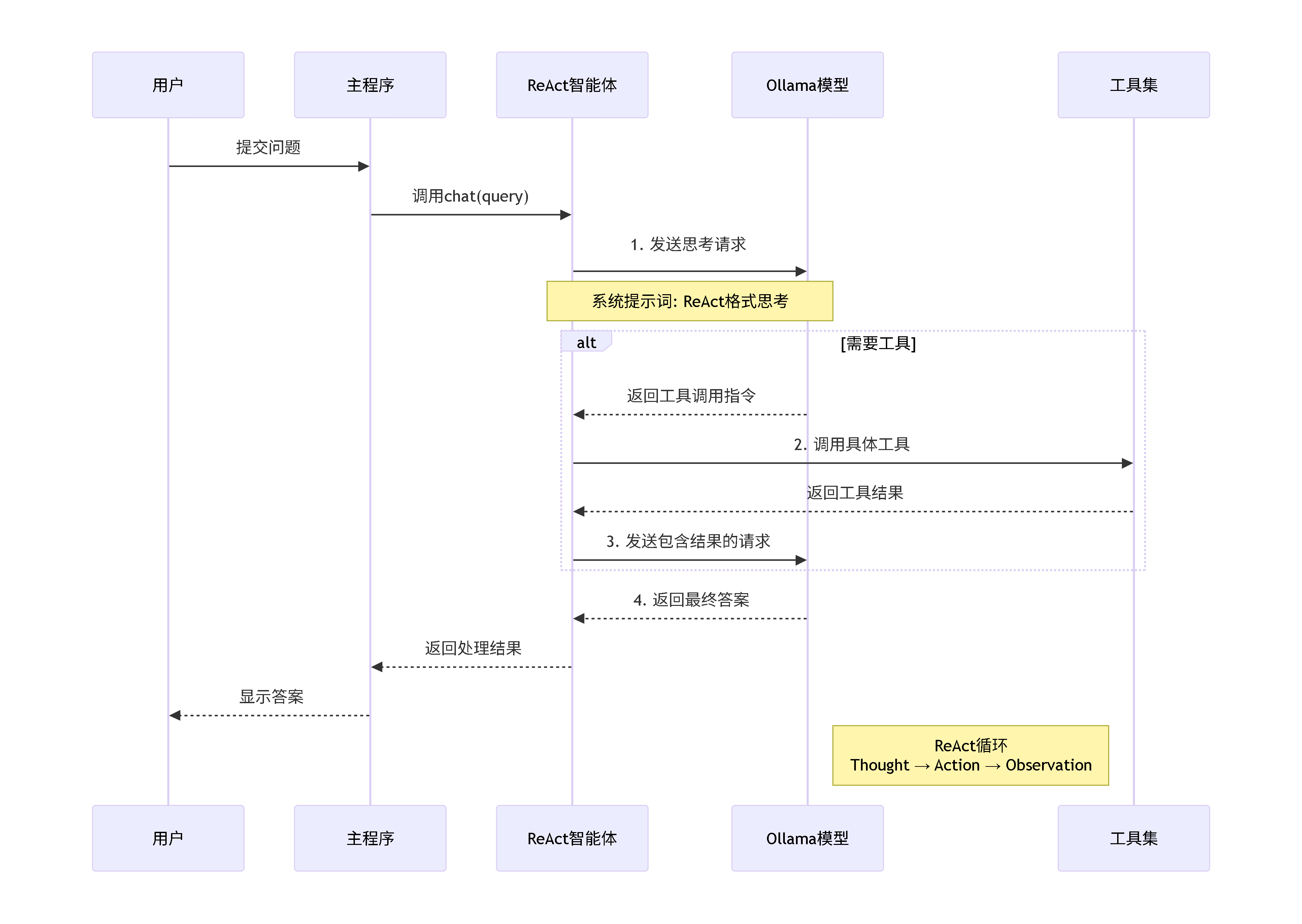
原文配图:ReAct:推理、行动与工具调用:简化时序图。